Lookback Window
A lookback window refers to the timeframe following an ad engagement such as ad click or view, during which subsequent app installs can be attributed to a specific ad.
What is Lookback Window?
An Lookback Window, also known as a conversion window, is a predefined period during which a user's action, such as a click or a conversion, can be attributed to a specific install. It essentially allows advertisers to identify which campaigns, channels, or touchpoints contributed to a conversion, providing insight into the effectiveness of their marketing efforts.
In Airbridge, there are two types of Attribution windows, each depending on the context: app installs or in-app events. For app installs, the predefined period is known as the Lookback Window. Conversely, for in-app events, the corresponding period is called the Attribution Window.
Why is Lookback Window needed?
One of the reasons why Lookback Window is important is that it secures a higher accuracy by setting a specific timeframe. Take this scenario as an example: you are using a 7-day lookback window to track app installs. A user clicks on an ad for a fitness app on January 1st. If the user then installs the fitness app anytime up until January 8th, the installation is attributed to the click on the ad from January 1st, because the install occurred within the 7-day lookback window. If the user installs the app on January 9th, outside of the 7-day window, the install would not be attributed to the ad click from January 1st.
There are also more benefits of using a Lookback Window:
1. Accuracy in Performance Measurement: It ensures that conversions are accurately credited to the right campaigns, helping marketers understand which strategies are working.
2. Optimized Marketing Budget: By identifying the most effective channels and campaigns, advertisers can allocate their budgets more efficiently, maximizing ROI.
3. Enhanced Customer Insights: Understanding the path to conversion helps marketers gain deeper insights into customer behavior and preferences, enabling more targeted and personalized marketing strategies.
How should I set up the Lookback Window?
Setting up an Lookback Window requires a careful balance between understanding your customer journey and aligning with your business goals. Here's how to approach it:
1. Analyze the Customer Journey: Consider the length of your sales cycle and the touchpoints a customer interacts with before making a purchase. This insight will guide the length of your Lookback Window. For example, campaigns utilizing transient ad formats like banner ads may benefit from a shorter Lookback Window, as the brief exposure is less likely to influence actions at any time soon. Conversely, campaigns encouraging active engagement, like playable ads, might require a longer window to assess their enduring impact. If an advertiser aims to evaluate the sustained value of a prominent ad placement within an app, selecting a 21 or 30-day window could provide insights into whether the campaign meets its objectives.
2.Consider the Marketing Channels: Different channels may require different Lookback Windows. For instance, social media ads might convert faster than email marketing, influencing the window setup to be shorter.
3. Use Analytics Tools: Leverage analytics and attribution tools, like Airbridge, that allow for customizable Lookback Windows. These tools can provide data-driven insights to inform your decision.
4. Test and Adjust: Start with a standard window based on industry benchmarks or historical data, then test different lengths to see which aligns best with actual customer behavior and your marketing goals.
5. Align with Business Objectives: Ensure that your Lookback Window supports your broader marketing and business objectives, whether that's increasing conversions, enhancing customer lifetime value, or improving ROI.
How does Lookback Window apply to Airbridge?
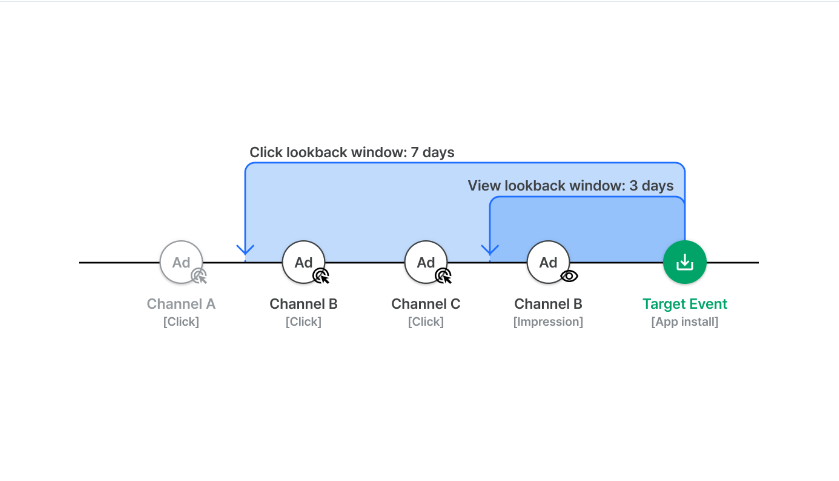
With Airbridge, the conversion is often referred to as Target Events, which are mainly App installs, but can also be Deeplink Opens and Deeplink Pageviews.
Here, you can attribute the winning touchpoint to the conversion only if they happen within the Lookback Window timeframe. In this case, only channel B - click, channel C - click, and channel B - impression are shortlisted for winning the attribution. Additionally, the Lookback Window length can be customized according to different types of events (clicks or impressions). For more information on how it works, please refer to Airbridge’s guide here.
Put these concepts into practice
See how Airbridge helps teams implement mobile attribution strategies at scale.