lockWindow
lockWindow in SKAdNetwork helps advertisers lock each of the three measurement windows sooner, thereby ending the measurement period earlier than the predefined schedule.
What is lockWindow?
SKAdNetwork(SKAN) 4 now supports three conversion windows that may result in up to three postbacks for winning ad attribution. The conversion window begins when the user first launches the app. The first conversion window spans days 0 to 2; the second window spans days 3 to 7; and the third window spans days 8 to 35. Apps can update conversion values during all three time-windows.
The lockWindow feature, introduced in Apple’s SKAN 4, marks a significant evolution in how advertisers can manage and customize the measurement or conversion windows for app-related activities. This functionality grants advertisers the flexibility to "lock" the measurement window for any of the three postbacks. However, due to the random timer length, this doesn't guarantee an immediate postback. Yet there is still a chance you can receive the postback earlier.
How does lockWindow work?
By default, the system awaits the closure of the conversion window to determine the final conversion value, allowing apps to modify this value up until the window's conclusion. Once the conversion window closes, the system generates the postback, and sends it after a random delay period—24-48 hours for the initial postback and 24-144 hours for subsequent second and third postbacks. Consider the scenario presented in the diagram below for a clearer understanding:
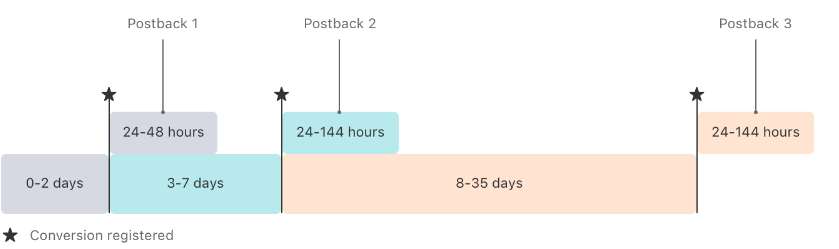
But what if waiting through the entire process isn't ideal for your strategy? The lockWindow function offers a solution, enabling you to secure and finalize a conversion value before the designated conversion window concludes. This option is available for any or all of the conversion windows. The following diagram illustrates an example where an app utilizes the lockWindow feature during the second conversion window:
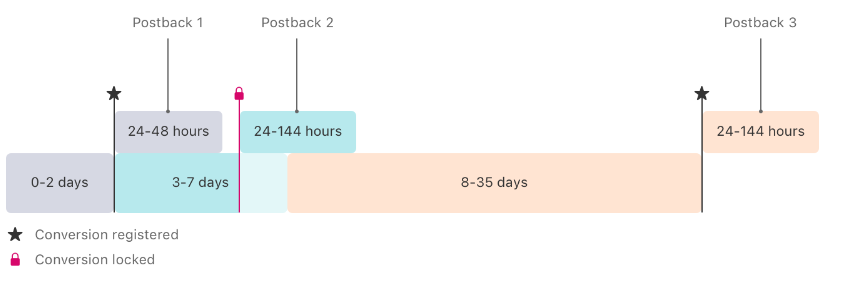
Upon securing a conversion value with lockWindow, the system immediately finalizes the postback preparation, disregarding any subsequent updates to the conversion value within that same conversion window. Postbacks are then sent following the established random delay: a 24–48-hour delay for the first postback, and a 24–144-hour delay for the second and third postbacks, without considering any additional conversion value modifications for the duration of that conversion window.
How to make the most out of lockWindow?
It is obvious that lockWindow can help you shorten the waiting time for a postback. But that is also the drawback of lockWindow, which lowers the amount of data that you can get. It is quite easy to understand, as the shorter the measurement time, the less data you will get. So how can you use lockWindow effectively?
The advice is to find the period after the app installs when a lion’s share of your users perform desired events. That is when you know that you have gathered enough data that you need, and it is time to lock the window to receive the postback earlier.
However, that should be applied to only the first measurement window. For the other 2 windows, you will need a full-length measurement time to better determine the effectiveness of your campaign performance.
Please keep in mind that this is an extra tip on how you receive ad attributions and postbacks with SKAN 4. To better understand the whole picture of SKAN 4, it is advisable to equip yourself with enough knowledge through Airbridge’s SKAN & ATT Solutions by registering our weekly newsletter or booking a demo to receive insightful recommendations from industry experts before playing around with Apple’s new features.